SnipeSearch Adclicks for WordPress
The plugin adds an Adclicks menu in wp-admin with Settings (feeds, ad units, caching) and Custom Blocks (layouts and shortcodes). Paste XML feed URLs or ad codes you create in the AdClick portal, then drop ads into posts and sidebars with shortcodes.
If the download does not start, place adclick-plugin.zip in your site root next to this page.
Built for publishers on WordPress
After activation you get Adclicks → Settings for feeds and ad units, and Adclicks → Custom Blocks for reusable layouts. XML feed URLs from the AdClick portal typically look like adclick.snipesearch.co.uk/display/index.php?page=query/feed/&feed=…&auth=… — paste those into an ad unit, tune caching, then use [adclick_block id="…"] wherever you want a block to render.
- XML feeds & ad codes
- Configurable cache
- Debug logging
- Shortcode blocks
SnipeSearch Adclicks — Settings
Add XML feed URLs or non-XML ad codes, set cache and defaults, and troubleshoot with optional debug logs.
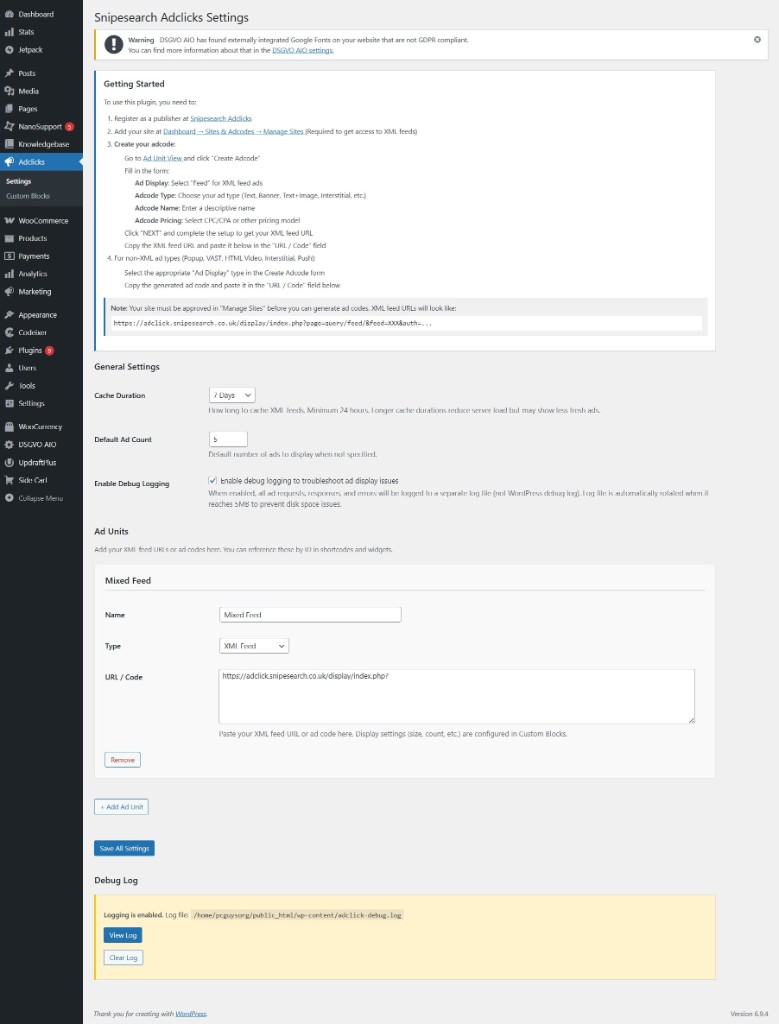
Getting started (in the plugin)
Use the AdClick Portal button in the header whenever you need the dashboard.
- AdClick Portal — open the dashboard from the header, add your site, and create adcodes (pick display such as Feed, type—Text, Banner, Text+Image, Interstitial—and CPC/CPA pricing).
- Integrate — for XML, paste the feed URL into an ad unit in WordPress; for popups, VAST, HTML video, etc., paste the generated code into the URL / Code field.
What you configure here
- General: cache duration (e.g. 7 days), default number of ads to show, optional debug logging.
- Ad units: name each unit, set type (e.g. XML Feed), paste the feed URL or ad snippet. Add multiple units for different placements.
- Debug log: when enabled, view or clear the log from wp-admin to trace feed and display issues.
Fine-grained layout (width, colours, how many ads) is handled in Custom Ad Blocks.
Custom Ad Blocks
Create reusable layouts that pull from your ad units — list or grid, custom width, background and border colours, and how many ads to show. Drop them anywhere with a shortcode.
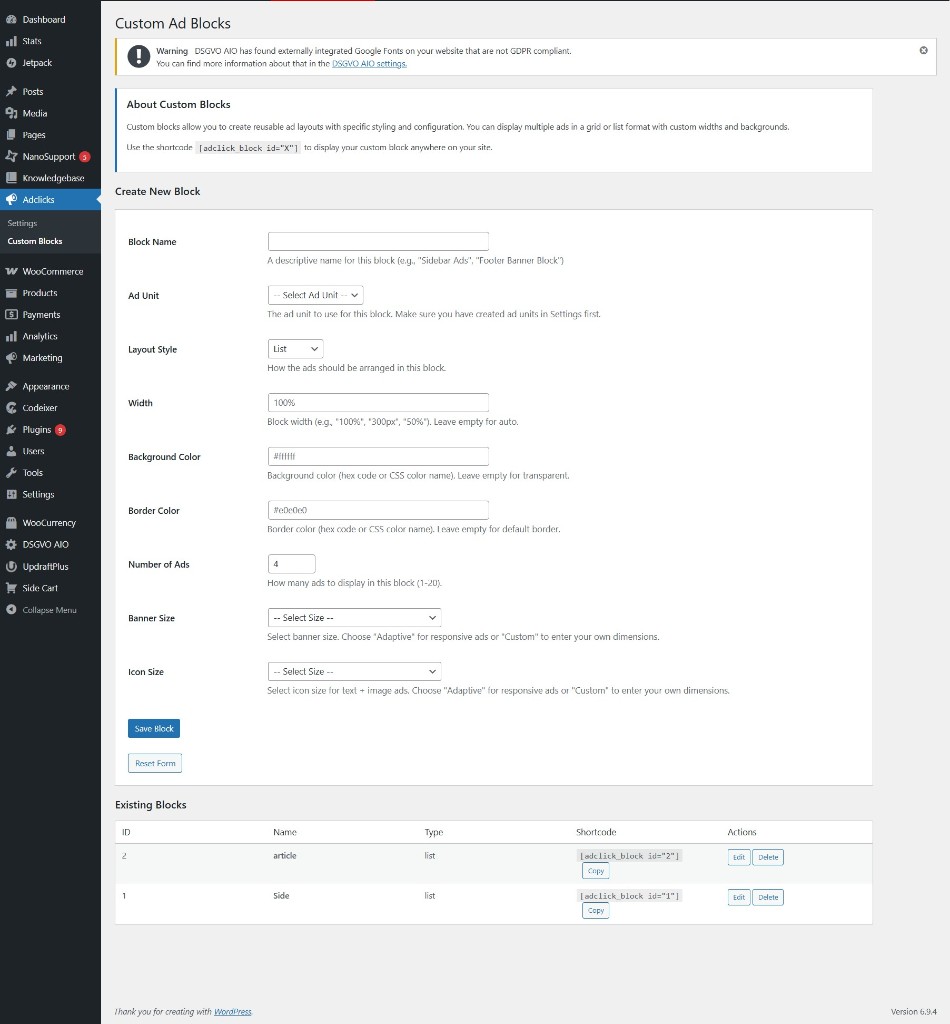
Create a block
Give the block a name, pick an ad unit, choose layout (e.g. list), set width and colours, number of ads (1–20), and banner/icon sizing (adaptive or custom). Save to generate a shortcode.
[adclick_block id="1"]
Replace 1 with your block ID from the table below.
Existing blocks
The table lists each block’s ID, name, layout type, full shortcode, and actions to copy, edit, or delete. Use Copy next to the shortcode to paste into posts, widgets, or block editor (shortcode block).
Install the plugin
Upload once, then add feeds and codes in Adclicks → Settings as described above.
-
1
Download the zip
Use the download button at the top of this page, or host
adclick-plugin.zipalongside your site files. -
2
Plugins → Add New → Upload
In wp-admin, choose Upload Plugin, select the zip, then Install Now and Activate.
-
3
Configure feeds & blocks
Open Adclicks → Settings, add ad units with XML feed URLs or codes you copied from the portal. Then use Adclicks → Custom Blocks to create layouts and paste shortcodes into your theme or content.
More walkthroughs, tips, and format guides live on the tips site.
Adclicks Tips and TricksSnipesearch Adclicks for Advertisers
A practical field guide to planning campaigns, writing ads, and troubleshooting delivery in the Adclicks ecosystem.
Buy on AmazonFull publisher & advertiser pages
Explore formats, pricing, features, and example ads on the dedicated landing pages.